 Divyesh Bhatasana
Quick Answer: What Is MotionMuse AI?
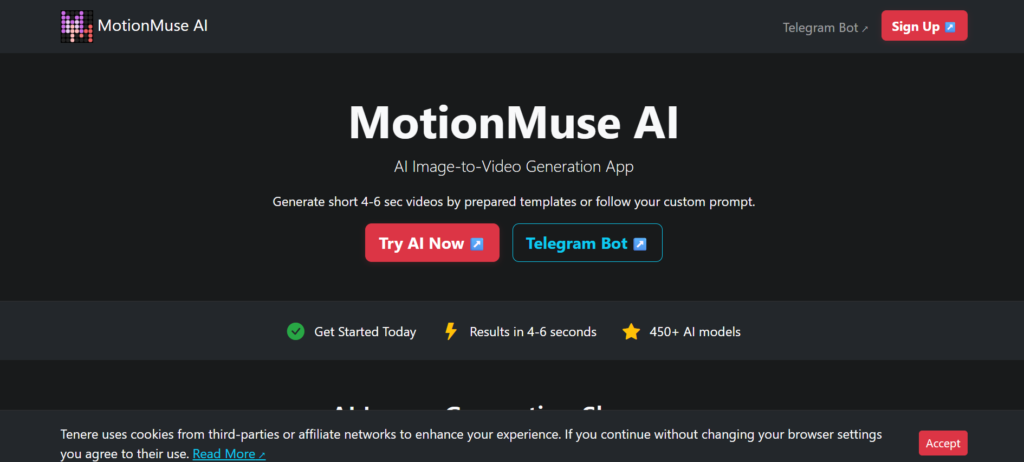
MotionMuse AI is an online browser-based AI image-to-video generator that is capable of turning images into short animation videos. To use the service, the user has to upload an image, choose one of the available styles of animation or simply describe what should happen to the uploaded image.
MotionMuse AI often pops up as a tool for making NSFW videos in web search results. However, apart from that, the platform can be applied for making general animations of images too. The fact that the video output produced by MotionMuse AI is short-form makes it better to be used for clips, portraits, and products than long videos.
MotionMuse AI at a Glance
| Feature | Details |
| Platform | Web-based |
| Main function | Image-to-video generation |
| Typical clip length | Around 4–6 seconds |
| Free access | Free credits may be available |
| Pricing model | Credit-based paid plans |
| Main use cases | Social content, portraits, product visuals and creative animations |
Understanding MotionMuse AI and Its Core Purpose
The MotionMuse AI service is designed to perform one specific function – adding movement to still images.. In contrast to other video generation services, it does not offer a full-fledged video editing environment but rather specializes in short animated videos based on the already available imagery.
There are two ways to create a video – you can either choose from a selection of available templates or enter a description of your desired movements using text prompts. Templates might be useful when you need to produce predictable animations, while the text prompts allow for more freedom.
Thus, MotionMuse AI is an easier option compared to more complex video-generation services. On the other hand, its simplicity prevents it from being used by people who need additional editing capabilities.
How MotionMuse AI Turns Images Into Videos
The basic workflow is designed to be relatively simple:
- Upload an image: Add a compatible JPG, PNG, or WebP image. Clear, high quality images generally provide a better starting point.
- Select a template or enter a prompt: Select a preset animation or define how the animation should run.
- Generate the clip: Submit the request and wait for the video to process. Time taken may differ according to system traffic and type of account.
- Review the result: Preview the generated clip and check whether the movement matches your expectations.
- Regenerate if required: If the output contains unwanted movement or visual inconsistencies, adjust the prompt or settings and try again.
- Download the video: Save the final result for your intended use, subject to the platform’s terms.
Generation after generation is able to use the credits, so experimentation will lead to rapid increase in their consumption.
Exploring the Main MotionMuse AI Features
MotionMuse AI concentrates on a number of key elements that make image animation easier.
Animation Templates
Predefined templates can assist the user in creating a movement without requiring any prompts. Predefined templates can be especially helpful for newbies trying out different animation styles.
Custom Motion Prompts
The user can tell what kind of movement he/she wants through natural language. A specific instruction like a slow camera movement or minor facial expression can give better instructions than an overall request.
Different Creation Modes
The platform can vary its control from simple to complex according to the current interface and subscription plan. It is recommended for users to look at the live platform for the specific controls applicable to their account.
Credit-Based Generation
Credits are used by MotionMuse AI for generation and other activities. This means that the number of credits you have can impact your experimentation process.
Short Video Generation
This is more inclined to short videos rather than long videos. It would make it easier to use for posting on social media, looping videos, creating gifs, and experimenting visually.
MotionMuse AI Pricing: Plans and Credits
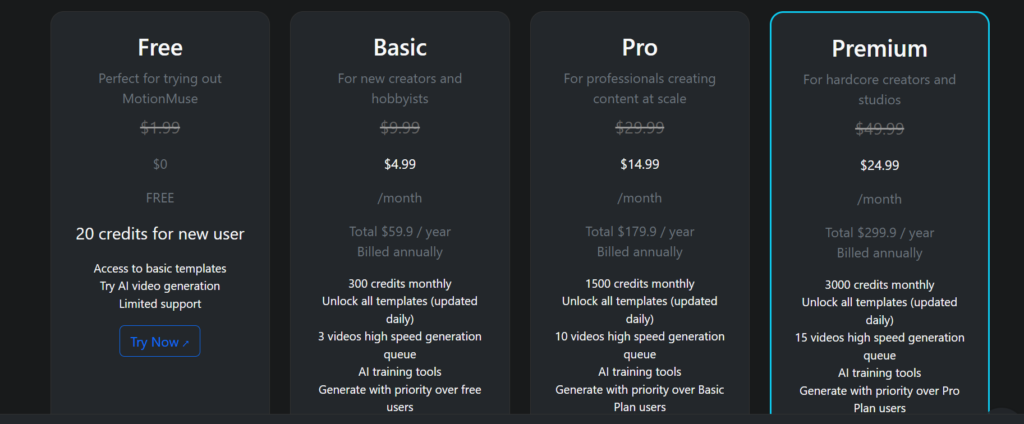
MotionMuse AI follows a pricing plan which operates on the basis of credits. The price details mentioned by third parties are Free, Basic, Pro, and Premium, but prices/credits may be variable.
| Plan | Reported Monthly Price | Reported Annual Monthly Price | Credits |
| Free | $0 | – | Limited/free credits |
| Basic | $9.99 | $4.99 | 300/month |
| Pro | $29.99 | $14.99 | 1,500/month |
| Premium | $49.99 | $24.99 | 3,000/month |
Some of the points that need to be considered while looking at the plans are:
- The free version may be helpful in testing the service prior to making payment.
- Yearly subscriptions will lower the monthly charge compared to monthly subscriptions.
- More expensive packages will offer you more credits in case of regular content creation.
- The cost you will incur is determined by the number of credits used during each generation process.
- Those who use the service regularly need to calculate the approximate cost per video generated.
What Can You Create With MotionMuse AI?
There are many potential applications of MotionMuse AI to short-form creativity.
Animated Portraits
The still image can be converted to moving clips in case of subtle animations based on the source image and generation settings used.
Product Visuals
Companies and individuals can explore possibilities of animating product images for social media or pair it with dedicated AI video advertising tools for full ad campaigns
Social Media Clips
Brief output will do great on the platform which supports short visual content such as Reels, Shorts, and others.
Creative Image Animation
Illustrations, artwork, characters, and other still images can be explored in creating short animations.
Adult-Oriented Content
Although MotionMuse AI is often connected to NSFW searches, it does not mean that all types of adult content are acceptable. Before creating any content, be sure to read the current content policy and terms of service.
How Good Are MotionMuse AI’s Video Results?
How good the AI-generated video will turn out highly depends on the image used, prompt used, movement that is requested, and model of generation.
When the motion to be done is basic, the output can be visually compelling. Any subtle camera motion, face animation, hair motion, or any other kind of controlled motion becomes relatively easy for an image-to-video model than complicated physical motions.
AI-generated videos can have inconsistencies too. The faces might vary a little, hands might get deformed, the background might flicker, and the motion may not correlate with the prompt.
For this reason, users should consider the first generation more of a beginning point than a guarantee that every output will be production ready.
MotionMuse AI User Experience
The AI-based MotionMuse works according to a rather uncomplicated browser interface. Users can load an image, select generation techniques, place their order, and see the video preview online without the need to install any desktop software.
The uncomplicated procedure can make the software user-friendly. On the other hand, users with the need for advanced editing capabilities will feel more restricted on such a site compared to specialized video editing.
Generation time can also be variable. The conditions in the queue, the account being used, and even the amount of traffic on the entire site could influence this.
Is MotionMuse AI Safe and Legit?
MotionMuse AI can be considered a working AI video application online, but legitimacy and privacy are separate considerations.
Before uploading an image on the platform, one should read the privacy policy and the terms of use carefully. Paying attention to the handling of the images is especially important.
You should also consider the following:
- Only upload images that you have authorization to use.
- Do not upload any personal images unless it is absolutely necessary.
- It is not permitted to create sexually intimate or explicit images without the individual’s consent.
- Images of children are not to be used to create any sexually explicit or pornographic images.
- It is always recommended that you first read the guidelines of the platform prior to creating NSFW images.
- Always check the commercial licensing guidelines before using images for business use.
- Always review the terms of cancellation and refunds before buying a subscription.
The privacy policies that appear on third-party websites are to be considered authentic only when they are validated by the official policies of the platform.
MotionMuse AI Pros and Cons
Pros
- Simple browser-based workflow
- No software installation required
- Free access may be available for testing
- Focused on quick image-to-video generation
- Useful for short-form creative content
- Template-based creation can help beginners
Cons
- Short video duration
- Credit usage can add up with repeated generations
- Limited control compared with professional video platforms
- AI outputs may require multiple attempts
- Content and NSFW permissions should be checked carefully
- Privacy and data-handling policies should be reviewed before uploading sensitive images
Best MotionMuse AI Alternatives
However, MotionMuse AI is not the only one that provides an image to video service. In case of other kinds of projects, one could use other websites such as Kling AI, Google Veo 3.1, Runway, Pika, and Luma Dream Machine.
| Platform | General Focus | Suitable For |
| Kling AI | AI video generation | More advanced video creation |
| Runway | AI video and creative tools | Professional creative workflows |
| Google Veo 3.1 | AI video and creative tools | Creative social content |
| Pika | AI video effects and generation | Creative social content |
| Luma Dream Machine | AI video generation | Cinematic-style experiments |
The pricing, limitations, number of models, and policies vary from time to time, so it is necessary to check all of these on the respective platforms.
Who Is MotionMuse AI Suitable For?
- Social media creators looking for short animated visuals
- Beginners exploring image-to-video AI
- Ecommerce users experimenting with animated product images
- Creators producing short visual loops
- Users who prefer a simple browser-based workflow
Who Should Consider Another Tool?
- Longer video generations
- Detailed timeline editing
- Advanced camera controls
- Frame-level adjustments
- A professional video production workflow
- Clearly documented policies for a specific sensitive use case
Final Verdict
The MotionMuse AI software adopts a targeted approach of using AI for generating videos through converting still images to videos. The software offers a straightforward process and templates that might appeal to new users, and it uses a credits approach which enables scalability of use according to an individual’s requirements.
However, the limitations of the tool include short videos, consumption of credits, and requirement for verification of existing policies regarding content and privacy.
MotionMuse AI offers free access for users who need instant animations or wish to try the tool for social media. If you require long videos, advanced settings, or video editing features, then you may consider comparing MotionMuse AI with more elaborate AI video tools.
FAQs About MotionMuse AI
1. Is MotionMuse AI free to use?
MotionMuse AI might provide a few free credits, with further use requiring subscription to a paid plan.
2. How much does MotionMuse AI cost?
Various third-party websites state that a paid plan starts from \$9.99 per month, but it is recommended to verify actual costs at the official website.
3. How long are MotionMuse AI videos?
The platform mainly creates video from images, and the videos created there are often between 4-6 seconds long.
4. Can MotionMuse AI create videos from images?
Yes. Video generation from images is the core feature of the platform.
5. Is MotionMuse AI safe to use?
They should also take the time to read its current privacy policy and terms before uploading any personal or sensitive images.
6. Can MotionMuse AI generate NSFW videos?
References online say that the app uses NSFW content, but they should check out the content policy on the app itself to see what they can use.