 Mayur Bhatasana
Quick Answer: What is Kling AI?
Kling AI is an AI video and image generator built by Kuaishou, the Chinese company behind the Kuaishou short video app. You give it a text prompt or a still image and it returns a short video clip, with sound. The current flagship model is Kling 4.0, which went live on 15 October 2026 and generates up to 30 seconds in a single pass. Paid plans run from $10 a month to $619 a month at list price, billed in credits.
Most of what you will read about Kling AI pricing is out of date. I checked the live membership page on 6 November 2026, and the plan structure has changed since the articles currently ranking for this topic were written. The top tier is no longer called Ultra and no longer costs $180. It is called Ultra+ and lists at $619.
That matters if you are budgeting. So this Kling AI review works from what the product actually shows today, and flags where the widely repeated numbers are wrong. Every price and rate below was read off Kling’s own pages this week, not copied from another article.
Kling AI at a glance:
| Built by | Kuaishou (Beijing ICP registration on the API site) |
| Current video model | Kling 4.0, live since 15 October 2026 |
| Also available | Kling 4.0 Flash, Kling 3.0, Kling 3.0 Omni, Kling 3.0 Turbo, Video 2.6 |
| Max clip length | 30 seconds native on 4.0, 15 seconds on 3.0 |
| Resolutions | 720p, 1080p, native 4K (4K on 3.0, not yet on 4.0 via API) |
| Free plan | Basic, $0, no monthly credits and no daily free credits |
| Paid plans | $10 to $619 a month list, four tiers, credit based |
| Commercial rights | Paid plans only |
| Best for | Short product and social clips, image to video, motion capture style animation |
What Kling AI actually does
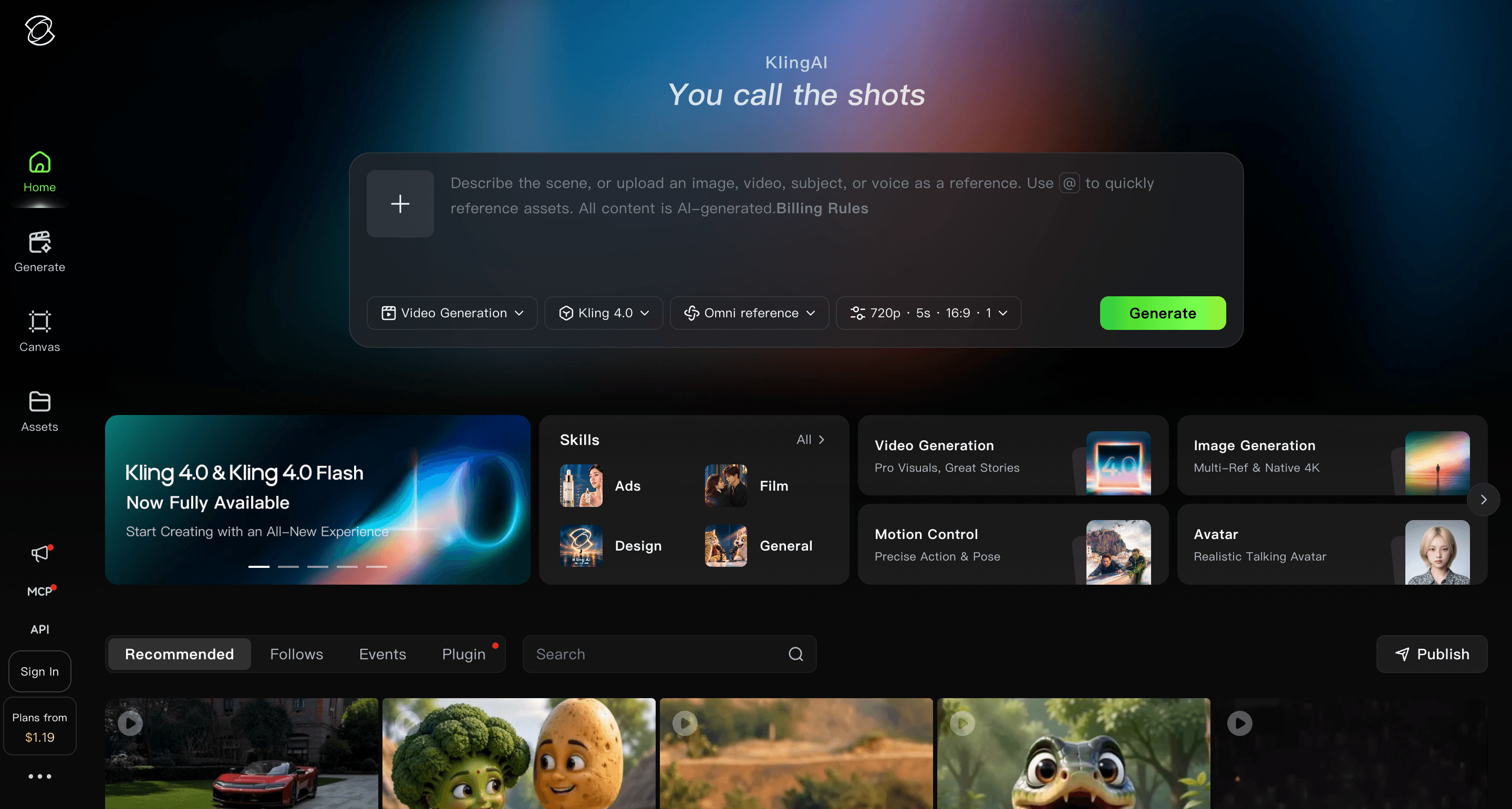
Kling started as an image to video tool and has grown into a small suite. The Creative Studio now holds Video Generation, Image Generation, Motion Control, Avatar, AI Portraits and Lip Sync, plus a node based canvas for stitching shots together and an MCP and CLI route for batch work.
The core loop is still simple. Upload an image or type a prompt, pick a model, pick a duration and resolution, and wait. What has changed over 2026 is how much the model can hold together across a longer shot, and whether it produces sound on its own.
Kling says 60 million people have used it and that it has generated over 600 million videos. Those are the company’s own figures, unaudited, so treat them as marketing rather than evidence.
What changed with Kling 4.0
Kling 3.0 arrived at the start of February 2026 and added synchronised audio, storyboarding and element reference. Native 4K followed in April, and a faster variant called 3.0 Turbo landed in June.
Kling 4.0 went live on 15 October 2026. On the membership page the company describes it as supporting “dynamic motions, Omni reference, native 30s-generation and multiple keyframes”. The headline change is duration. Thirty seconds in one generation is double what 3.0 managed, and it removes a lot of the stitching work that made longer Kling pieces look spliced.
There is a catch worth knowing before you plan a project around it. On the API pricing page, Kling 4.0 has no 4K rate at all. The 4K column is blank for both 4.0 and 4.0 Flash, while Kling 3.0 and 3.0 Omni both list 4K at 3.0 Units per second. If you need 4K today, you are using the older model.
Kling AI pricing in 2026
This is the section most articles get wrong, so here is what the live membership page shows. Prices are the standard monthly rate. The first month is discounted 30% as a one time offer, and yearly billing is marked 34% off.
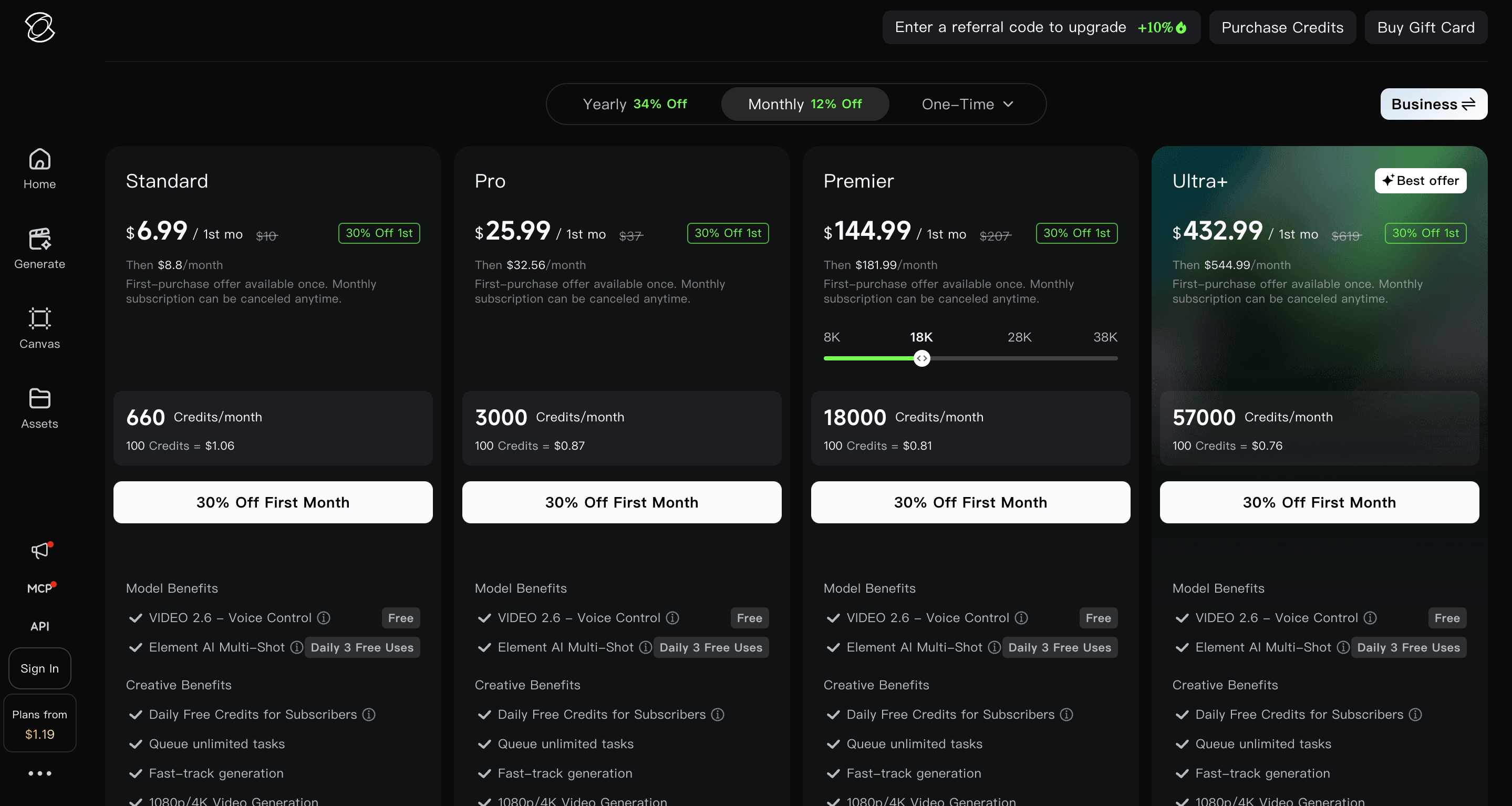
| Plan | List price | First month | Then per month | Credits per month | Cost per 100 credits |
|---|---|---|---|---|---|
| Basic | $0 | $0 | $0 | None | n/a |
| Standard | $10 | $6.99 | $8.80 | 660 | $1.06 |
| Pro | $37 | $25.99 | $32.56 | 3,000 | $0.87 |
| Premier | $207 | $144.99 | $181.99 | 18,000 | $0.81 |
| Ultra+ | $619 | $432.99 | $544.99 | 57,000 | $0.76 |
Compare that against what is currently ranking and you will see the problem. Several well trafficked pricing guides still list Premier at $92 with 8,000 credits and a top tier called Ultra at $180 with 26,000 credits. Those figures described a plan structure that no longer exists. Premier has roughly doubled in price and more than doubled in credits. The old Ultra tier has been replaced by Ultra+ at more than three times the price.
Premier also now offers a credit slider. The page shows 8K, 18K, 28K and 38K options, with 18,000 as the default. So Premier is less a fixed tier than a band you size to your usage.
What separates the tiers
- Basic gets no monthly credits, no daily free credits, one video per generation instead of four, no 1080p or 4K, the Kling watermark, and no commercial rights.
- Standard is the cheapest plan with commercial use, watermark removal, 1080p and 4K generation, fast track queueing and unlimited queued tasks.
- Pro adds priority access to new features and lifts the element library from 50 to 150.
- Premier keeps the same feature set as Pro with far more credits and the sizing slider.
- Ultra+ adds beta test invites and a 500 slot element library.
Voice Control on Video 2.6 is free on every tier including Basic, and Element AI Multi-Shot gives three free uses a day on every tier.
The free plan is smaller than you have been told
You will find the claim “Kling gives you 66 free credits every day” repeated across a lot of pricing articles. On the live plan comparison, the Basic tier shows a dash in the Daily Free Credits row. Daily free credits are listed as a subscriber benefit, which means they come with a paid plan, not without one.
I am not going to tell you the 66 credit figure was never true. Promotional allowances in this category change often, and it may well have been accurate when those pieces were written. What I can tell you is what the page shows today: Basic has no monthly credits and no daily credits.
So treat Basic as a look around rather than a usable free tier. You can see the interface. You cannot run a project on it.
What a Kling video actually costs
Credits are spent per second of output, and the rate moves with resolution and whether you want sound. The widely reported consumer rates are 6 credits per second at 720p without audio, 8 at 1080p without audio, 9 at 720p with native audio, 12 at 1080p with native audio, and 30 for native 4K. Voice Control adds 2 credits per second on top.
Run that against the credit allowances and the picture gets concrete fast.
- Standard’s 660 credits buy about 55 seconds of finished 1080p video with sound per month. Eleven five second clips.
- At 720p with no audio, the same 660 credits stretch to about 110 seconds.
- In native 4K, 660 credits buy about 22 seconds a month. Not a typo.
- Pro’s 3,000 credits give roughly four minutes of 1080p with sound.
- Premier’s 18,000 give about 25 minutes. Ultra+’s 57,000 give close to 80.
A single five second 1080p clip with audio costs 60 credits, which works out at about 64 cents on Standard and about 46 cents on Ultra+.
Those numbers assume every generation lands. They will not. Budget for two or three attempts per shot you actually use, and the real cost per approved clip is closer to $1.50 than 64 cents.
Kling API pricing, including the 4.0 rates
Several pricing articles state that Kling has not published credit rates for 4.0. The consumer app may not show them, but the developer pricing page does, billed in Units per second rather than credits.
| Model | Condition | 720p | 1080p | 4K |
|---|---|---|---|---|
| Kling 4.0 | No input video | 1.0 Unit/s | 1.5 Units/s | Not offered |
| Kling 4.0 | With input video | 0.6 Units/s | 0.9 Units/s | Not offered |
| Kling 4.0 Flash | No input video | 0.6 Units/s | Not offered | Not offered |
| Kling 4.0 Flash | With input video | 0.4 Units/s | Not offered | Not offered |
| Kling 3.0 Turbo | With native audio | 0.8 Units/s | 1.0 Unit/s | Not offered |
| Kling 3.0 | No native audio | 0.6 Units/s | 0.8 Units/s | 3.0 Units/s |
| Kling 3.0 | With native audio | 0.9 Units/s | 1.2 Units/s | 3.0 Units/s |
| Kling 3.0 | Motion Control | 0.9 Units/s | 1.2 Units/s | Not offered |
| Avatar | Any | 0.4 Units/s | 0.8 Units/s | Not offered |
The billing detail that makes video input more expensive, not less
Look at the Kling 4.0 rows again. Feeding the model an input video appears to cut the rate from 1.0 to 0.6 Units per second at 720p, which reads like a 40% saving.
It is not. The page states that when you supply an input video and its duration is less than or equal to the output, the billable total is output duration multiplied by two. So 0.6 Units per second against double the seconds comes to 1.2 Units for every second of finished video. That is 20% more than the 1.0 you would pay for straight text to video, not 40% less.
The same inversion applies at 1080p, where 0.9 doubled is 1.8 against a headline 1.5. On 4.0 Flash it is worse: 0.4 doubled is 0.8 against 0.6, a third more expensive.
If your input video runs longer than your output, the formula changes again to input plus output. Either way, the lower per second number on video to video work is not a discount. Price it on finished seconds, not on the rate card.
E-commerce endpoints nobody else covers
The API page also carries a set of commerce specific solutions that none of the pricing guides I read mention. AI Apparel Replicator runs 1.3 Units per second at 720p with on camera speech and 1.7 with off camera voiceover. Goods Studio is 1.7 at 1080p and 2.0 at 4K. Video Commerce runs 1.0 for creator voiceover and 1.4 for product voiceover at 720p.
If you sell physical product and you are already producing ad creative at volume, those endpoints are more interesting than the general video model, because they are built for the exact shot types a product catalogue needs.
What you can make with it
Product and commerce clips
Animating a flat product shot into a short rotating or lifestyle clip is where Kling is strongest, and the dedicated commerce endpoints show where the company is putting its effort. This is also the use case that sits closest to what most teams buy AI creative production for in the first place.
Social cutdowns
Five to fifteen seconds suits Reels, Shorts and TikTok natively. Thirty seconds on 4.0 opens up a full social spot without stitching.
Character and avatar work
Avatar, AI Portraits and Lip Sync cover talking head output. At 0.4 Units per second for 720p Avatar, this is the cheapest thing on the rate card.
Motion capture style animation
Motion Control is pitched at recreating complex movement and facial expression from reference. It bills at the same rate as 3.0 with audio, so it is not a budget feature, and for brand work it still sits a long way behind hand built motion design on control.
How good are the results
Good on controlled motion, inconsistent on anything physically complex. That has been true of every image to video model I have used and Kling is no exception. The same pattern shows up across the whole category, not just here.
Slow camera pushes, hair movement, fabric, subtle facial expression, a product rotating on a surface: these land often enough to be useful. Hands interacting with objects, crowd scenes, anything with specific physics, and text that has to stay legible across the clip: these need multiple attempts.
Kling 3.0 added native text rendering and element consistency specifically to fix the last two, and 4.0’s keyframe support gives you more control over where a shot starts and ends. Both help. Neither makes the first generation a sure thing.
Treat the first output as a draft. If you need a specific shot rather than a pleasing one, you are iterating.
Commercial rights, safety and where your data goes
Commercial use is a paid feature. The plan comparison shows “Generated content is for commercial use” as a dash on Basic and a tick on every paid tier, alongside watermark removal. If you plan to put output in front of customers, Standard at $10 is your floor.
Two things worth knowing that the pricing guides skip entirely.
First, the company. Kling is a Kuaishou product and its developer site carries a Beijing ICP registration. For most creators that is irrelevant. For anyone in a regulated category, or anyone whose procurement team asks where processing happens, it is the first question they will raise. None of the articles ranking for Kling pricing address data handling, retention or processing location, and neither does the pricing page.
Second, permission. A platform granting you commercial rights to your output does not give you rights to whatever went into it. If you upload a photograph of a person, a competitor’s product shot, or a track you do not own, Kling’s terms do not fix that for you. Clear your inputs before you upload them.
Pros and cons
Pros
- Thirty second native generation on 4.0 removes most stitching work
- Native audio and lip sync built in rather than bolted on
- Genuinely strong on product and image to video motion
- Dedicated commerce endpoints that competitors do not offer
- Credit pricing drops meaningfully at higher tiers, from $1.06 to $0.76 per 100
- Commercial rights start at $10 a month, which is cheap for this category
- Published API rates for the current model, which is rarer than it should be
Cons
- The free tier gives you no credits, so there is no real free trial
- Standard’s 660 credits are 55 seconds of 1080p video a month, which runs out fast
- Native 4K costs 30 credits a second and is not available on 4.0 yet
- Video input billing doubles the chargeable duration, which is easy to miss
- Failed and unusable generations still cost you
- Subscription credits expire a month after they are issued
- No published documentation on data handling or processing location
Kling AI alternatives
| Tool | Where it is stronger | Where Kling wins |
|---|---|---|
| Google Veo 3.1 | Prompt adherence and audio quality, Google ecosystem access | Price per second, commerce specific endpoints |
| Runway Gen-4.5 | Editing environment and professional workflow control | Raw cost, image to video motion |
| Seedance 2.0 | Very low per second cost | Audio, duration, feature breadth |
| Luma Dream Machine | Cinematic look on open ended prompts | Consistency across shots, commercial tooling |
| Pika | Effects and stylised output | Length, resolution ceiling, API depth |
Worth noting for anyone still looking for it: Sora 2 is gone. OpenAI shut the consumer app on 26 April 2026 and closed the API on 24 September 2026. Any comparison article still recommending it was written before that and has not been updated since.
We have tested most of this category on real brand assets rather than demo prompts. If you want the wider view, our roundup of the best AI video generators covers how these models compare outside of price, and our MotionMuse AI review looks at the cheaper end of image to video.
Who Kling AI suits
- Ecommerce and D2C teams animating product stills for paid social creative
- Social teams who need short clips weekly for the content calendar and have no footage to edit
- Creators who want image to video without learning an editing suite
- Developers building generation into a product, where the API rates are competitive
Who should look elsewhere
- Anyone who needs 4K on the newest model, which is not available yet
- Teams needing frame level editing, timeline control or precise retakes
- Regulated industries that require documented data handling before approval
- Anyone expecting a usable free tier, because Basic gives you no credits
- Brands that need a finished video rather than a clip, since output still needs editing, grading and sound work
That last point is the one teams underestimate. A model gives you footage. Turning footage into something that runs as ad creative or sits on a landing page is a separate job, and it is why most brands running AI generation at volume still keep a human production layer behind it.
Final verdict
Kling AI is one of the better image to video models available right now, and the 30 second generation on 4.0 is a real step rather than a version bump. For product and social work, it earns its place.
The pricing is where you need to be careful. The headline $10 entry is honest, but 660 credits is less output than it sounds, 4K eats credits at five times the 1080p rate, and the gap between Pro at $37 and Premier at $207 is steep enough that most teams will sit on Pro and buy top ups.
My practical advice: start on Standard, generate at 720p while you are finding the shot, and only spend 1080p or 4K credits on prompts that have already worked. That one habit will stretch a plan further than upgrading will.
And if what you actually need is finished video rather than raw clips, a model is the wrong purchase. Generation is about 20% of the work. The rest is selection, editing, sound, grading and getting it on brand, which is the part that still takes a person. That is the gap a video production team fills, and no credit balance closes it.
Frequently asked questions
Is Kling AI free?
There is a free Basic plan, but it includes no monthly credits and no daily free credits, so you cannot generate with it in any meaningful way. Basic also keeps the watermark, limits you to one video per generation and excludes commercial use. The cheapest usable plan is Standard at $10 a month, or $6.99 for the first month.
How much does Kling AI cost per month?
As of November 2026, Standard lists at $10, Pro at $37, Premier at $207 and Ultra+ at $619 a month. The first month carries a 30% discount and yearly billing is marked 34% off. Note that several widely shared pricing guides still quote an older structure with Premier at $92 and a top tier at $180, which no longer matches the live page.
How many credits does a Kling video use?
Credits are charged per second of output. The reported consumer rates are 6 credits per second at 720p without audio, 8 at 1080p without audio, 9 at 720p with audio, 12 at 1080p with audio and 30 for native 4K. A five second 1080p clip with sound therefore costs about 60 credits.
How long can a Kling AI video be?
Kling 4.0 generates up to 30 seconds in a single pass. Kling 3.0 tops out at 15 seconds. Longer pieces are built by extending or stitching clips together, and quality tends to drift the further you push past the native limit.
Does Kling AI support 4K?
Yes, but only on Kling 3.0 and 3.0 Omni, which bill 4K at 3.0 Units per second through the API. The developer pricing page shows no 4K option for Kling 4.0 or 4.0 Flash. Kling Image 3.0 does generate native 4K stills.
Can I use Kling AI videos commercially?
On any paid plan, yes. Commercial use and watermark removal are both listed as paid benefits and are unavailable on the free Basic tier. Bear in mind that commercial rights to the output do not cover the rights to anything you uploaded as input.
Do Kling credits expire?
Yes. Credits issued with a subscription are valid for one month from the date they are granted, while credits bought separately as top ups are reported to last two years. Unused subscription credits do not roll over indefinitely, so a heavy month followed by a light one wastes the balance.
Who owns Kling AI?
Kling is built by Kuaishou, the Chinese technology company behind the Kuaishou short video platform. Its developer site carries a Beijing ICP registration. The company reports more than 60 million users and over 600 million videos generated, though those are self published figures.